
What shipped: .NET 11 and C# 15 are released. Union types, async validation, OpenAPI 3.2 generation and LINQ FullJoin are among the changes available to explore. What I’m watching: application-level Runtime Async is still opt-in preview; Blazor AI components are experimental; some database features depend on the provider and server version.
Microsoft released .NET 11 on 10 November 2026. The download page lists the 11.0.0 runtime and 11.0.100 SDK. C# 15 is the default language version when a project targets net11.0.
For people who maintain ASP.NET Core business systems, the interesting news is how much of the daily work has become easier to express. Validation can await a lookup. A full join can expose missing records from either side. An API document can describe more of the responses a client actually receives. C# can name a finite set of business outcomes directly.
I have split this guide into two lists. The first five cover the platform: ASP.NET Core, data access, API contracts, Blazor and SignalR, plus runtime and tooling. The next five cover C# 15 itself. Each starts with a problem a junior developer may recognise, then shows what has changed and what remains their responsibility. The snippets are small teaching examples, not a complete lending application.
The five .NET 11 changes I would watch
1. Async validation: check a value without blocking a request
Synchronous validation is enough for a required field or a string length. It is awkward when a rule needs to ask another service whether a reference exists, or query a database for a duplicate. Doing blocking I/O inside a synchronous validator is a poor response to that need. Moving the check into an endpoint by hand works, but teams then need to coordinate basic and asynchronous validation themselves.
.NET 11 introduces AsyncValidationAttribute and IAsyncValidatableObject. In ASP.NET Core, Minimal API validation invokes the asynchronous path. A validator can await a catalogue or database call and receive a cancellation token. In a fictional application, an applicant might enter a product code. A synchronous [Required] rule checks that a value was supplied; an async rule checks whether that code is currently offered. These are different questions and can produce different messages.
Here is the shape of a property rule. IProductCatalogue is an application interface you would implement and register with dependency injection; it is not a .NET built-in type. The attribute leaves empty values to [Required] and asks the catalogue only when it has a code to check:
public sealed class OfferedProductAttribute : AsyncValidationAttribute
{
    protected override async Task<ValidationResult?> IsValidAsync(
        object? value, ValidationContext context, CancellationToken ct)
    {
        if (value is not string code || string.IsNullOrWhiteSpace(code))
            return ValidationResult.Success;

        var catalogue = context.GetRequiredService<IProductCatalogue>();
        return await catalogue.IsOfferedAsync(code, ct)
            ? ValidationResult.Success
            : new ValidationResult("Product is not offered", [context.MemberName!]);
    }

    protected override ValidationResult? IsValid(
        object? value, ValidationContext context) =>
        throw new InvalidOperationException("Use asynchronous validation");
}

public sealed record ApplicationRequest(
    [property: Required, OfferedProduct] string ProductCode);
The snippet assumes System.ComponentModel.DataAnnotations, Microsoft.Extensions.DependencyInjection and Microsoft.Extensions.Validation are in scope. In a real Minimal API, you also need the validation services and the registered catalogue implementation. The point to notice is the CancellationToken: if the client abandons the request, the lookup can stop too. Microsoft's complete validation guidance covers registration and discovery.
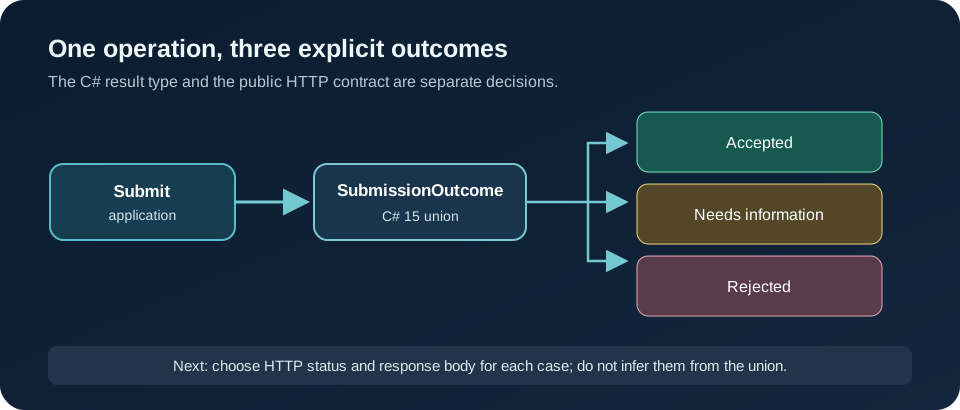
This is a framework improvement, not permission to put every business policy in an attribute. A rule that changes an application state, needs a transaction, or depends on several external systems still belongs in the application workflow. The remote check must also have a clear timeout, cancellation behaviour and failure policy. “Catalogue unavailable” is not the same answer as “product code invalid”.
The entry point matters. Microsoft’s validation guidance says Minimal APIs use the async validation path. Blazor form validation also uses it for per-field checks and for EditContext.ValidateAsync, which EditForm uses on submission. The old synchronous EditContext.Validate path is obsolete in .NET 11. Options validation has a separate async DataAnnotations path. Do not assume a validator will be awaited everywhere merely because the interface exists; check the host and the actual path your application calls. In particular, audit existing MVC validation behaviour before replacing a synchronous rule.
There is also a practical contract detail. Microsoft’s examples implement both synchronous and asynchronous members, even when the synchronous member throws because that rule cannot safely run synchronously. That makes accidental use of the wrong path visible. I would start with one low-risk lookup, test valid, invalid, cancelled and dependency-unavailable requests, and inspect the error response seen by a client.
2. FullJoin and EF Core: see both sides of a mismatch
An operations analyst comparing payment records with ledger entries wants three groups: matched records, payment-only records and ledger-only records. A left join cannot show the final group on its own. .NET 11’s LINQ FullJoin makes that intent readable for in-memory collections:
record Payment(string Reference);
record LedgerEntry(string Reference);

Payment[] payments = [new("A100"), new("B200")];
LedgerEntry[] ledger = [new("A100"), new("C300")];

var rows = payments.FullJoin(
    ledger,
    payment => payment.Reference,
    entry => entry.Reference);

foreach (var (payment, entry) in rows)
{
    string status = (payment, entry) switch
    {
        (not null, not null) => "Matched",
        (not null, null) => "Payment only",
        _ => "Ledger only"
    };

    Console.WriteLine($"{payment?.Reference ?? entry?.Reference}: {status}");
}
The missing side arrives as default, normally null for these reference types. That is why the example checks for null before using either record. The result is easy to explain to a non-developer: A100 matched; B200 appears only in payments; C300 appears only in the ledger.
Try it yourself: add a second payment with reference A100. The result now contains more than one pair for that key. A full join is not a duplicate detector by itself. Before reconciling financial data, decide whether the join key must be unique and what repeated keys mean. That is a useful mentoring question because the method can be correct while the business conclusion is wrong.
There is an important boundary here. The example joins arrays in memory. It does not prove that a query against every database provider will become one SQL full outer join. EF Core 11 documents translation of FullJoin to FULL JOIN for relational queries, but a team should check its provider, generated SQL and query plan. Some database engines or provider combinations may have different capabilities. Do not fetch two large tables into memory just to reuse this sample. For a production reconciliation, decide where the comparison belongs, constrain the data, and measure it with representative volumes.
EF Core 11 also gives SQL Server teams a more targeted improvement: it can create and scaffold JSON indexes over paths inside mapped complex types. That is relevant if an application stores structured contact or preference data in JSON and filters by a nested property. It is not a free speed-up. Native JSON support and index behaviour depend on the SQL Server or Azure SQL target. Verify the database version, provider configuration, migration and query plan before promising an improvement.
3. OpenAPI 3.2: describe the API clients actually receive
For Web API teams, ASP.NET Core 11 now generates OpenAPI 3.2 documents by default. This will surface in generated client packages, API documentation, contract checks and gateways that consume the document. If one of those tools does not yet accept 3.2, the app can request an earlier OpenAPI version explicitly. Treat the document change as an integration test, even when endpoint behaviour has not changed.
For example, the following configuration asks for 3.1 while a client generator catches up. This is a compatibility choice, not a reason to leave the API contract untested:
builder.Services.AddOpenApi(options =>
{
    options.OpenApiVersion = Microsoft.OpenApi.OpenApiSpecVersion.OpenApi3_1;
});

app.MapOpenApi();
builder and app are the usual ASP.NET Core host objects. Check the generated document in CI and run the client generator your consumers use. If a response changes shape, a successful server build alone does not prove the integration still works.
The generated description is also more precise in useful places. ASP.NET Core can preserve multiple declared response representations for the same status code, and OpenAPI 3.2 can describe the item type of a server-sent event stream. For an endpoint that returns a PDF or either JSON or text, inspect the generated schema and ask whether a client would know what to expect. Document generation can now reflect [Obsolete] as a deprecated operation or schema member. That helps consumers plan a migration, provided the annotation reflects a real decision by the API owner. The ASP.NET Core 11 release notes give the exact supported cases and configuration.
4. Blazor and SignalR: make long-running screens easier to use
Blazor developers gain practical form-validation changes as described above. The release also adds Virtualize navigation features, including an initial item index and an API to scroll to an item. Consider a long case list where a user opens a case, goes back, and needs to return to roughly the same position. That is a clearer reason to try the feature than a generic promise of faster pages. Test how your data provider loads items and how the UI behaves on a phone. Separately, Microsoft’s Blazor AI components are marked experimental; they are something to study and prototype, not a routine dependency for a stable business screen.
The component API is small enough to remember:
<Virtualize TItem="CaseSummary" Items="cases"
            InitialItemIndex="500" @ref="caseList">
    <div>@context.Title</div>
</Virtualize>

@code {
    private Virtualize<CaseSummary> caseList = default!;
    private List<CaseSummary> cases = [];

    private Task ReturnToTop() => caseList.ScrollToItemAsync(0);
}
CaseSummary and the list are illustrative application types. InitialItemIndex applies on the first interactive render; call ScrollToItemAsync after rendering. The release notes say a call before that render throws, so do not put it in the component constructor.
For SignalR apps, authentication refresh can update credentials on an active connection. A dashboard or case-worker console that stays open for hours may benefit because an expiring bearer token need not force a reconnect. The feature is enabled per hub, and teams still need to decide whether a refreshed identity is allowed to keep the connection. Test expiry, rejected refresh and claims changes. This is about maintaining a valid authenticated session, not relaxing authorisation.
5. Runtime Async and the MCP template: choose experiments carefully
Runtime Async caught my attention because async stacks are part of daily debugging. Microsoft describes a model in which the runtime manages suspension and resumption, aiming for clearer live call stacks and lower overhead. The core runtime libraries are already built with it, but turning it on for application code is still an opt-in preview. A project targeting net11.0 can try runtime-async=on; it no longer needs the separate EnablePreviewFeatures setting for this scenario. Those are different adoption states. I would compare diagnostics and tests in a small service before considering wider use. I would not promise a performance gain for a particular workload without a benchmark.
<!-- A deliberate experiment in a net11.0 project, not a default setting -->
<PropertyGroup>
  <TargetFramework>net11.0</TargetFramework>
  <Features>runtime-async=on</Features>
</PropertyGroup>
For the experiment, take a trace from the same operation before and after the switch. Check stack readability, exceptions, cancellation and library compatibility. The interesting question is whether it helps your debugging and workload, not whether the feature is new.
The .NET 11 SDK includes an MCP server template. The verified starting command is dotnet new mcpserver -o MyMcpServer. MCP gives an AI client a common way to discover and call tools. For a business application, a sensible first exercise is a read-only product catalogue lookup with a fixed query shape and limited results. The template removes some setup work; it does not decide which data the client may see. Authentication, authorisation, input limits, logging, error handling and the risk of exposing sensitive records remain the engineering work. I would keep a write operation out of the first experiment.
dotnet new mcpserver -o MyMcpServerUse that command to inspect the sample, then decide what a client is allowed to ask. A catalogue lookup could return a code, name and public description. It should not quietly return internal pricing, customer records or unrestricted SQL results. That access decision is more important than the template command.
The five C# 15 features I would teach first
1. Union types: make the possible outcomes visible
A lending application might receive an application and return one of three results: accepted for processing, more information required, or rejected. This is a fictional example; it says nothing about a real lending decision.
Before C# 15, a team might wrap these outcomes in a broad base class, return object, or carry a status flag beside several nullable properties. A reader has to look elsewhere to find every permitted state. With a C# 15 union type, the type itself names the cases:
public sealed record Accepted(Guid ApplicationId);
public sealed record NeedsInformation(string Reason);
public sealed record Rejected(string Reason);

public union SubmissionOutcome(Accepted, NeedsInformation, Rejected);

SubmissionOutcome outcome = new NeedsInformation("Proof of income is missing");

string message = outcome switch
{
    Accepted accepted => $"Received {accepted.ApplicationId}",
    NeedsInformation request => request.Reason,
    Rejected rejected => rejected.Reason,
};
The conversion from a case to SubmissionOutcome is implicit. The compiler checks that a switch expression covers its cases. If the business later adds UnderManualReview, a switch that should handle every case becomes a place to revisit. That is valuable when results pass through services, handlers and UI code.
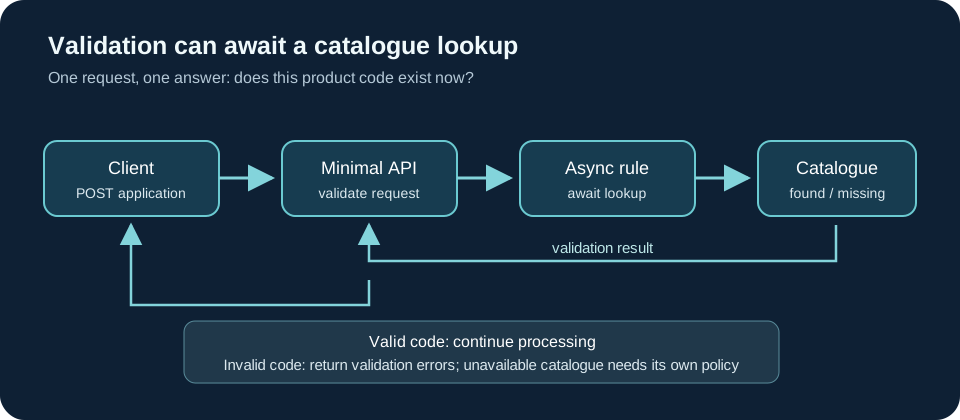
The diagram shows two design layers. The union describes an application result. It does not decide whether a public API should return 202, 400, 409, or another status. That depends on the meaning of the operation and the contract you have promised clients. Nor should a database entity automatically become the public response body. Choose the HTTP status and response schema explicitly, then make sure your OpenAPI document describes them.
This is the C# feature I would try first because it invites a concrete design conversation: what can this operation actually return? Its tradeoff is that changing the set of cases can force callers to update their handling. For a deliberately finite set of business outcomes, that friction is useful. For an open plugin model, it may be the wrong fit. Microsoft also added closed hierarchies, which suit an inheritance model whose direct derived types are controlled by one assembly. I would choose between them based on ownership of the types, not on which syntax looks shorter.
2. Closed hierarchies: model a family you own
Suppose an application has a case that is Draft, Submitted or Finished. The team owns all three classes and wants a caller to handle every case. C# 15's closed modifier can express that relationship:
public closed record class CaseState;
public record class Draft : CaseState;
public record class Submitted(DateTimeOffset At) : CaseState;
public record class Finished(DateTimeOffset At) : CaseState;

static string Label(CaseState state) => state switch
{
    Draft => "Draft",
    Submitted s => $"Submitted at {s.At}",
    Finished f => $"Finished at {f.At}",
};
The compiler knows the direct derived types in the declaring assembly, so it can check this switch without a catch-all arm. That is why this matters: a new case creates work where the code must consider it. A closed base is implicitly abstract. The restriction on derivation is not automatically transitive through every descendant, so read the language note on intermediate types before designing a deeper hierarchy.
When to choose it: use a closed hierarchy when the types naturally share a base and your assembly owns that family. Use a union when you want to bring separate existing types under one result type. Neither design chooses the JSON format or database mapping for you. Try it: add a Cancelled state and inspect which switches the compiler asks you to review.
3. Collection expression arguments: state how a collection should be made
A junior developer may already know ["a", "b"] as a collection expression. C# 15 adds with(...) arguments at the front. They pass constructor or factory arguments while keeping the contents visible:
string[] importedCodes = ["PL-1", "pl-1", "PL-2"];

HashSet<string> distinctCodes =
    [with(StringComparer.OrdinalIgnoreCase), .. importedCodes];

List<string> buffer =
    [with(capacity: importedCodes.Length * 2), .. importedCodes];
The set keeps one of PL-1 and pl-1 because its comparer ignores case. The list reserves room for later additions; it still contains only the imported values at this point. That difference between capacity and count is worth teaching. Reserving capacity is a small allocation decision, not a promise of a speed gain in every application. The comparer is a correctness decision: use the comparison rule your business identifier actually requires.
Try it: change the comparer to StringComparer.Ordinal and count the set again. The behaviour changes because the rule changed, not because the collection syntax is magical.
4. Extension indexers: make a familiar lookup readable
C# 15 lets an extension block define an indexer. This can be useful when a type you cannot edit has a clear and stable way to retrieve an item. For teaching, consider a sequence:
public static class SequenceIndexers
{
    extension(IEnumerable<int> sequence)
    {
        public int this[int index] => sequence.ElementAt(index);
    }
}

IEnumerable<int> numbers = Enumerable.Range(10, 5);
int third = numbers[2]; // 12
The receiver parameter has a name because an indexer is an instance-style member. The syntax makes the call concise, but it does not change the cost of ElementAt. On a sequence that must be traversed, repeated indexing may be expensive. On an ordinary array, an extension indexer adds no value because the array already supports indexing. Use it where the indexed meaning is clear; do not use it to disguise a remote call or a slow search behind [].
Try it: change numbers to a list, then ask whether you need this extension at all. Good language features are optional tools, not instructions to rewrite existing code.
5. Labelled break and continue: leave the intended loop
When one loop sits inside another, a plain break leaves only the inner loop. Developers often add a Boolean flag to escape the outer one. C# 15 allows labelled break and continue, so the target is visible at the jump:
string[][] pages = [["A", "B"], ["C", "STOP"], ["D"]];

nextPage: foreach (string[] page in pages)
{
    foreach (string item in page)
    {
        if (item == "STOP")
            continue nextPage;

        Console.WriteLine(item);
    }
}
This prints A, B and C, skips the rest of the second page, then prints D. The label sits on the outer loop; continue nextPage starts its next iteration. Use break nextPage if you want to leave both loops completely. This is worth knowing when parsing batches or scanning a grid, though a named helper method may still be clearer for longer logic.
Try it: replace continue nextPage with plain continue and predict the output before running it. The difference is the entire reason for the feature.
One preview boundary in C# 15
The memory safety changes are a preview with explicit opt-in settings. They matter most to teams working with unsafe code and native interop. I would watch the design and migration guidance, but I would not present those rules as part of the default C# 15 experience. The five examples above use released language features and require no LangVersion=preview when targeting net11.0.
Other updates worth a look
- SDK tooling: a Native AOT CLI host and warm MSBuild server aim to reduce repeated command overhead. Try them in your own build and CI workflow before claiming a time saving. .NET 11 announcement.
- Libraries: built-in Zstandard compression and broader JSON support may matter for high-volume services or data interchange. Check both ends of the wire before changing a format. .NET 11 announcement.
- EF Core 11 complex types: JSON-mapped complex types can now be used with TPT and TPC inheritance; the Cosmos provider also has broader complex-type support. This matters to teams already using those mappings, not every EF application. EF Core 11 notes.
Should an existing application move now?
For a developer experimenting locally: yes, install the .NET 11 SDK alongside the existing SDK and make a small scratch project. Try a union for a finite set of results, then inspect its JSON and API description if it crosses a service boundary. That teaches more than changing a target framework in a large solution on launch day.
For a team starting a new service: .NET 11 is a reasonable option if your hosting environment, build agents, libraries and EF provider support it, and if the team is comfortable with its support window. Start with a plain supported feature set. Keep preview Runtime Async and experimental UI pieces as explicit trials.
For a team running a stable .NET 10 application: there is no launch-day requirement to move. The Microsoft support table lists .NET 11 as STS and .NET 10 as LTS, both with an end-of-support date of 14 November 2028 as of 10 November 2026. The labels describe support policy, not a quality ranking. Keep .NET 10 current on servicing updates, then plan an upgrade around a tested need or your normal release cycle. Before choosing, check the actual hosting image or Azure service support, your EF provider, OpenAPI consumers and deployment pipeline.
The first thing I would try this week is a union around one application operation with three real outcomes. I would ask a teammate to read the type, then read the HTTP mapping and OpenAPI output. If those tell the same story, the feature has earned its place. If they disagree, .NET 11 has given us a useful way to find a design problem early.